
We were hired for maintenance. Within three weeks, the AWS bill became the bigger problem.
A client switched their AWS operations contract from a previous vendor to us. The scope was simple: keep the lights on. But during the standard onboarding audit — the one we run on every new account before we touch anything — the cost report kept getting flagged. The bill had been climbing for two years. Nobody had pushed back on it because nobody owned it.
After a week of digging, we walked into the consultation with a single claim: we can take roughly 40% off this monthly bill without rewriting a single application service. Eight weeks later, we did. Here's exactly what we changed, what we left alone, and why most of the savings came from infrastructure decisions — not application code.
We're documenting this engagement because the biggest savings came from fixing operational habits, not rebuilding systems. The public IPv4 charges alone were large enough to justify the whole project, and once we started tracing the rest of the infrastructure, it was obvious how small architectural shortcuts taken over years had compounded into a recurring monthly tax.
A maintenance handover turned into a full AWS cost audit on a 150+ ECS service workload. Four architectural changes — moving every workload from public to private subnets (eliminating ~260 unused public IPv4 addresses), migrating ECS Fargate tasks to Graviton (ARM64), restructuring Jenkins to a slim master plus ephemeral Spot agents, and consolidating CloudWatch dashboards — cut the monthly bill from ~$18,000 to ~$10,800. That's a 40% reduction, ~$86K recurring annual savings, with zero application code rewrites and zero production incidents.
The Setup We Inherited
Before any numbers, the scale matters. This wasn't a side project running on a t3.micro.
- 150+ ECS servicesacross production, sandbox, and a UAT-style “key-way” environment
- 250+ running tasks at steady state, more during deployments
- Mixed database stack: MySQL on RDS, PostgreSQL on RDS, and DocumentDB
- Self-hosted GitLab and Jenkins for CI/CD
- A single AWS region, multi-AZ, mostly
us-east-1 - Multi-tenant SaaS workload — real production traffic, real customer impact
The client's product team was strong. The infra had simply accumulated decisions over two years of fast shipping. Most of those decisions were defensible at the time. Together, they had quietly become a recurring monthly tax.
The Audit: Where the Money Was Actually Going
The first job in any cost optimization is unromantic — pull the last three months of billing and find the top consumers. Not the noisy services. The expensive ones.
We exported Cost Explorer to CSV, grouped by service, and walked the top entries. The breakdown looked like this:
| Service | Share of monthly bill |
|---|---|
| ECS / Fargate | ~45% |
| VPC (mostly public IPv4) | ~20% |
| EC2 (CI/CD + GitLab + spot) | ~8% |
| Data transfer + NAT | ~6% |
| DocumentDB | ~5% |
| RDS (MySQL + PostgreSQL) | ~4% |
| CloudWatch | ~3% |
| Everything else | ~9% |
The total was around $18,000/month. The first three lines accounted for nearly three-quarters of it.
This is the part of the audit that determines whether the engagement is worth taking. If the top three are well-tuned, you're hunting for nickels. If they're not, the math gets interesting fast.
The heuristic we keep coming back to: if the top three services account for more than 70% of the bill, and the infrastructure has evolved organically over multiple years, the account is almost certainly carrying expensive architectural decisions nobody has revisited since the original build. AWS publishes a cost optimization pillar in the Well-Architected Framework that covers this approach formally — it's worth a read before any audit.
The Bigger Discovery: Everything Was in Public Subnets
The deeper we went into the VPC, the more obvious the problem became.
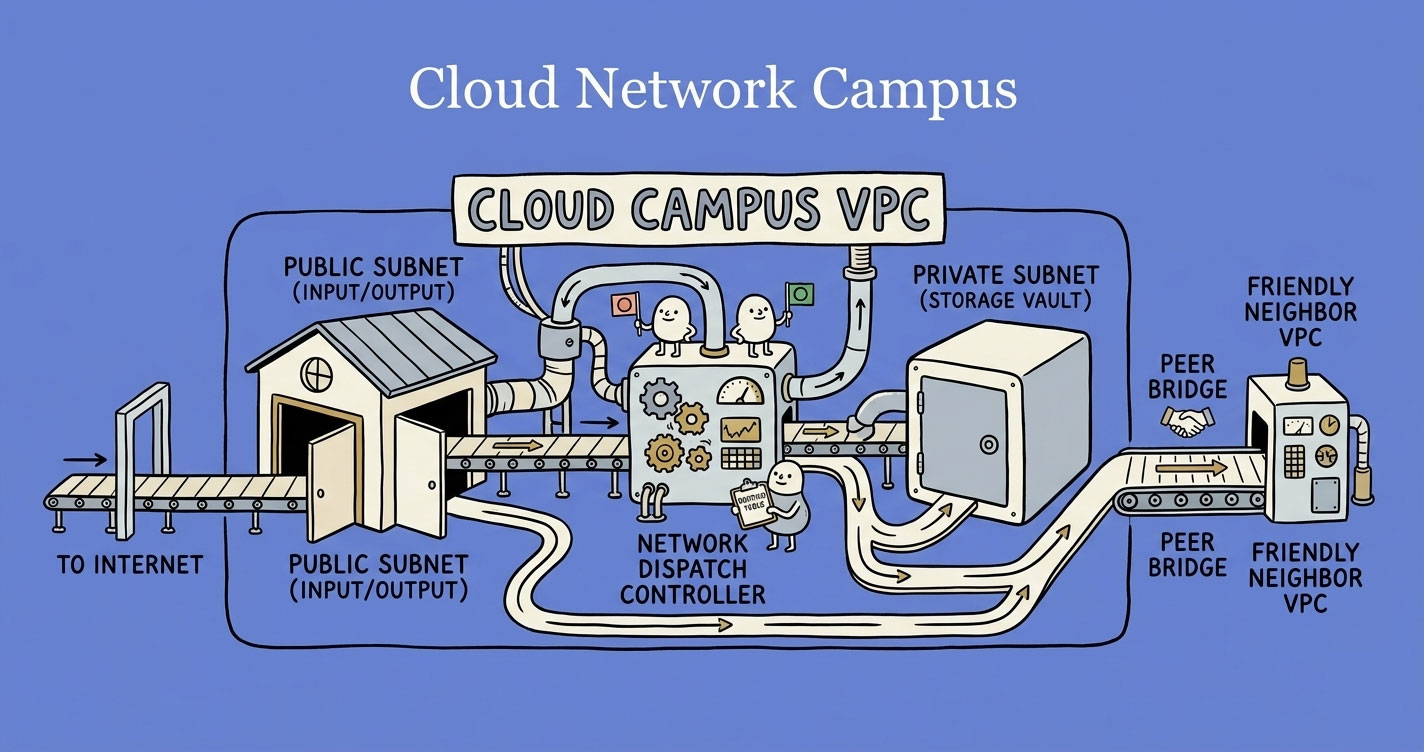
Every ECS task. Every database. Every internal service. Public subnets, all of them. Each task running with assignPublicIp: ENABLEDso it could pull container images and call external APIs. The architecture had been built to optimize for “deployment works on the first try” — not for cost or for security.
That single design choice was responsible for most of the VPC line on the bill, and we'll get to why in the next section. But it also meant the network had no real perimeter. The only thing standing between a misconfigured security group and the public internet was the security group itself.
We brought this up in the consultation as the first big-ticket item. The client's response was the same one we hear every time: “That's how the previous vendor set it up. We assumed it had to be that way.”
It didn't. If you want the long version of why, this is the same architectural mistake covered in VPCs, subnets, and routing — explained like a real system, not a textbook. The short version: a private subnet with NAT and a few VPC endpoints does everything a public subnet does, for a fraction of the cost and a fraction of the exposure.
The redesign was the foundation everything else sat on top of:
Two subnet tiers per AZ. Three AZs in production, two in non-prod. NAT Gateways for outbound calls. And — the cheapest single change in the entire engagement — VPC Endpoints for S3, ECR, SSM, SSM Messages, and CloudWatch Logs.
The S3 endpoint matters more than people realize. ECR images are stored in S3 under the hood. If your private-subnet ECS tasks pull images through the NAT Gateway, you pay per-GB data processing charges on every deployment. Add an S3 Gateway Endpoint and that traffic stops touching NAT entirely. Gateway Endpoints (S3, DynamoDB) are free; Interface Endpoints (ECR, SSM, Logs) cost ~$0.01/hour per AZ but typically pay for themselves on the first big deployment.
resource "aws_vpc_endpoint" "s3" {
  vpc_id            = aws_vpc.main.id
  service_name      = "com.amazonaws.us-east-1.s3"
  vpc_endpoint_type = "Gateway"
  route_table_ids   = aws_route_table.private[*].id
}

resource "aws_vpc_endpoint" "ecr_dkr" {
  vpc_id              = aws_vpc.main.id
  service_name        = "com.amazonaws.us-east-1.ecr.dkr"
  vpc_endpoint_type   = "Interface"
  subnet_ids          = aws_subnet.private[*].id
  security_group_ids  = [aws_security_group.endpoints.id]
  private_dns_enabled = true
}
# Repeat for: ecr.api, logs, ssm, ssmmessages, ec2messages
We rolled this out one environment at a time. Sandbox first, then key-way, then production — two weeks apart, one weekend each.
The Public IPv4 Trap
This deserves its own section because most engineers still don't realize it exists.
Since February 2024, AWS charges $0.005 per hour for every in-use public IPv4 address. That's about $3.65/month per IP. It sounds small. It isn't.
The client was running roughly 300 public IPs at any given moment. Most of them were attached to ECS tasks running in public subnets that had no business being publicly addressable. The math:
- Before: ~300 IPs × $0.005 × 730 hours ≈ $1,095/month
- After: ~40 IPs (ALBs, NAT Gateways, a handful of jump-box-style instances) × $0.005 × 730 ≈ $146/month
A clean $950/month saved from one architectural change. Annualized, that single line item paid for the entire engagement.
What surprised the client most wasn't the application or database cost — it was realizing they'd been spending close to a thousand dollars every month to keep public IPs attached to workloads that were never supposed to be internet-facing in the first place.
The IPv4 charge is almost invisible in the AWS console. It's the silent budget killer— buried under “Amazon Virtual Private Cloud” in Cost Explorer, not under EC2 or ECS where the tasks themselves run. Most teams scan the bill, see “VPC: $1,100/month” and assume it's NAT Gateway or peering. It isn't. It's IPs they didn't know they were paying for. AWS's own Public IP Insights tool inside VPC IPAM is the fastest way to surface them.
In Cost Explorer, group by usage type and look for PublicIPv4:InUseAddress. If the number surprises you, you're not alone.
Migrating ECS Workloads to Graviton
ECS was 45% of the bill. Graviton (ARM64) instances and Fargate ARM tasks run 20-40% cheaper than x86_64 with comparable or better performance. That's the headline.
The actual migration is more nuanced. Most pure-language services (Node.js, Python, PHP without native extensions) move with a one-line change to the task definition and a multi-arch container build. Some don't, and the failure modes are quiet — a task that boots fine but segfaults under load, a pip installthat succeeds because it pulled a wheel that won't run.
We started with the Dockerfile. Multi-arch builds are non-negotiable here:
# multi-arch build with buildx, runs on ARM64 and x86_64
FROM --platform=$BUILDPLATFORM node:20-alpine AS builder
WORKDIR /app
COPY package*.json ./
RUN npm ci
COPY . .
RUN npm run build
RUN npm ci --omit=dev

FROM --platform=linux/arm64 node:20-alpine
WORKDIR /app
COPY --from=builder /app/dist ./dist
COPY --from=builder /app/node_modules ./node_modules
USER node
EXPOSE 3000
CMD ["node", "dist/server.js"]docker buildx build \
--platform linux/amd64,linux/arm64 \
--tag $ECR/$SERVICE:$TAG \
--push .Then the ECS task definition flips one field:
{
  "runtimePlatform": {
    "cpuArchitecture": "ARM64",
    "operatingSystem": "LINUX"
  }
}
That's the easy part. The hard part is knowing in advance which services will break.
High-risk: native and binary dependencies
This is the #1 cause of failed ARM64 migrations across all three languages we had in production.
Node.js — npm packages with native addons compiled for x86 will fail. Common offenders:
sharp(image processing — has ARM64 wheels but version-sensitive)bcrypt(usebcryptjsinstead — pure JS, no native dependency)canvas,puppeteer,playwrightsqlite3,better-sqlite3- Any package with a
binding.gypor prebuilt binaries
Python— pip packages with C extensions break if they don't ship ARM64 wheels:
numpy,scipy,pandas— generally fine on modern versions, older pinned versions may not bePillow,lxml,cryptography— usually fine on modern versions- Any package pulling
.whlfiles withmanylinux_x86_64in the name will fail - ML libs:
torch,tensorflow— ARM64 support exists, version-sensitive
PHP— C extensions compiled into the image won't work on ARM:
imagick,gd,redis,memcached,xdebug- Any custom
.soextension compiled for x86
Medium-risk: runtimes and bundled binaries
- Node.js < 16 has spotty ARM64 support. 18+ is solid.
- Python < 3.8 wheels are often x86-only. 3.9+ is generally fine.
- PHP < 7.4 has ecosystem gaps. 8.x is well-supported on ARM.
- Bundled binaries inside containers (
wkhtmltopdf,ffmpeg,ghostscript, custom Go/Rust binaries) must be the ARM64 build. - Vendor agents (DataDog, New Relic, AppDynamics) — check their ARM64 support explicitly. Most are fine. A few aren't.
Usually safe
| Component | Why it's fine |
|---|---|
| Pure JS/TS code | Interpreted, no recompile |
| Pure Python code | Same |
| Pure PHP code | Same |
| AWS SDK (all three languages) | ARM64 builds available |
| Most major frameworks (Express, FastAPI, Laravel) | Pure language, no native code |
| RDS, DocumentDB, ElastiCache, S3 connections | Network calls, architecture-agnostic |
| Environment variables and secrets | Unaffected |
How we actually rolled it out
We didn't migrate 150 services in a sprint. We classified them.
- Inventory —
docker buildx imagetools inspecton every image to confirm what was actually running. Thennpm ls,pip list,composer showto surface native dependencies. - Triage — services were tagged green (pure language), yellow (some native deps, modern versions), or red (legacy native code or pinned old versions).
- Roll out — green services migrated in non-prod, ran for a week, then prod. Yellow services went through full E2E tests. Red services were deferred entirely.
Out of ~150 services, ~140 made it to ARM64 cleanly. Seven didn't. We'll cover those in the “what we didn't migrate” section.
The most annoying failure came from a Node.js service that looked completely safe during the audit — the application itself was pure TypeScript. But one indirect dependency was pulling a prebuilt x86 binary at runtime during image generation. The container built fine, passed basic health checks, and only started failing once a specific background job ran under production-like traffic. Far harder to trace than the usual “container won't start” failure.
The combined ECS savings (Fargate ARM pricing + downsized task sizes for services we'd been overprovisioning) cut that line of the bill roughly in half.
Sample ECS billing comparison
This is the kind of side-by-side that makes the case in a single screenshot. Numbers below reflect typical Fargate pricing for a 150+ service workload.
| Line item | Before (x86_64) | After (ARM64) | Saved |
|---|---|---|---|
| AWS Fargate vCPU | 295,000 hrs × $0.04048 = $11,942 | 180,000 hrs × $0.03238 = $5,828 | $6,114 |
| AWS Fargate Memory | 590,000 GB-hrs × $0.004445 = $2,623 | 360,000 GB-hrs × $0.003557 = $1,281 | $1,342 |
| ECS subtotal | $14,565 | $7,109 | $7,456 (51%) |
Two of the savings stack here: the per-unit ARM discount, and the rightsizing pass we did during migration. Roughly a third of the services were running with more vCPU than they ever used. We trimmed during the migration window because the task definition was already being touched. One thing to watch when you tighten task memory: set it below what the runtime actually expects and you'll get exit code 137 before the first request completes — covered in why your Docker container gets OOMKilled.
Image size is another lever teams miss when rightsizing ECS tasks. A 1 GB image versus 200 MB changes how fast new tasks reach healthy during deployments and scale-out events — and adds up on ECR storage and inter-AZ pull bandwidth across a large fleet. The practical approach is in how to reduce Docker image size without breaking glibc.
Optimizing CI/CD: Jenkins Was Running 24/7 for No Reason
The client's Jenkins setup was the most expensive single mistake, dollar-for-feature, in the entire account.
It was a single t3.2xlarge instance — eight vCPUs, 32 GB RAM — running 24/7 at around $250/month. Daily build volume was 30–50 deployments across the team. Outside of working hours, the box was idle.
Worse, it was an all-in-one master: routing, queuing, and execution all on the same instance. Every build competed with every other build for resources on a server that was sitting at 4% utilization most of the day.
The fix is the textbook Jenkins architecture, but most teams skip it because the all-in-one setup “works”:
Three changes:
- Slim master. Move the master to a
t4g.small. It only needs to route — pipeline execution moves entirely to agents. (Andt4g.smallqualified for the free trial AWS was running through end of 2025, which made the master effectively free for the duration.) - Ephemeral agents. Use the EC2 plugin to spin up an agent when a build is queued and terminate it when the build finishes. A 10-minute build pays for 10 minutes, not 24 hours.
- Spot instances for agents. Build workloads are exactly what Spot Instances were designed for. Builds tolerate interruption — at worst, you retry. Spot pricing is up to 90% cheaper than on-demand depending on instance family.
After: master + spot agents averaging around $25/month combined. That's roughly $225/month saved on a single workload, with no developer impact and faster builds (no resource contention between concurrent jobs) — you pay only for build minutes.
GitLab moved off m5.xlarge to m6g.large the same week — pure architecture switch with zero application change. Another ~$100/month gone.
The only real resistance was the word “spot.” The team assumed builds would vanish mid-deployment, so before touching production we ran the entire CI workload on spot-backed non-production agents for two weeks and tracked interruption frequency, failed pipelines, and rebuild time. In practice, interruptions happened twice in the whole window. The affected builds retried automatically and finished on the next available agent.
Small Wins That Actually Compound
The headline numbers come from ECS, IPv4, and CI/CD. But “bits and pieces” matter more than they sound — we found another $300/month across smaller line items, which adds up to $3,600/year for an afternoon of work each.
CloudWatch dashboards
The account had 15 dashboards. When we asked why, nobody had an answer. Dashboards had been added per service over time and never pruned. CloudWatch charges $3/dashboard/month — small per unit, $45/month combined.
We consolidated to 5 dashboards: one per environment (production, key-way, sandbox), one for high-traffic services that needed isolation, and one for load-test metrics. Trimmed the metric count too, from ~165 to ~80. Total CloudWatch line: $95/month → $39/month.
Availability zones
Production was running across 6 AZs. Non-prod across 3. AWS recommends 2–3 AZs for high availability — six is overkill that nobody could justify. We dropped production to 3 AZs and non-prod to 2. The savings here weren't dramatic on their own, but every AZ removed cut another batch of public IPs (which we'd already moved to private, but still).
Database rightsizing
DocumentDB and RDS instances on x86 (db.t3.medium, db.t3.micro) all moved to Graviton (db.t4g.medium, db.t4g.micro). RDS Graviton and DocumentDB Graviton migrations are essentially zero-downtime — AWS handles the switch on the next maintenance window or via a manual failover. About 10–15% off each instance for no application change.
We also looked at 90 days of CloudWatch metrics for every database. Two RDS instances were running at 1–2% CPU and 4% memory. Downsized one tier without touching application config.
Always check 90-day metrics, not 7. Quarterly batch jobs and end-of-month workloads will bite you if you only look at the last week.
What We Didn't Migrate (And Why That Matters)
This section exists because cost optimization that ignores risk is just expensive theatre.
Worth being precise here: every service moved to private subnets, including the seven we're about to discuss. They all got the public-IPv4 and subnet-redesign savings. What they didn't get was the Graviton compute discount — they stayed on x86 Fargate. Architectural changes are usually safe to apply broadly. Compute-architecture changes aren't.
Of the 150-odd services, seven stayed on x86 instead of moving to ARM64. Three reasons:
- Two services using Playwright with custom browser automation. Playwright supports ARM64 in newer versions, but these services were pinned to an older release with x86-specific Chromium binaries baked into a custom layer. Migrating meant a Playwright upgrade, which meant a regression test pass on flows we hadn't touched in two years. The math didn't justify it. Annual savings would have been ~$400. Engineering cost would have been weeks.
- Three legacy PHP 5.6 services. These were running an old Laravel 6 codebase with
imagickand a custom.soextension that nobody on the current team had built. Upgrading PHP would cascade into upgrading Laravel, which would cascade into rewriting service logic that hadn't changed in three years. The right answer was: leave them alone, schedule a proper rewrite for next year, accept the x86 cost in the meantime. - Two services with vendor agents that didn't support ARM64 cleanly. A monitoring agent and a license-validation daemon. Vendor said “ARM64 support is on the roadmap.” We left those services on x86 and revisit quarterly.
One of the more important conversations during the engagement was explaining that “possible to optimize” and “worth optimizing” are two different things. In a few cases, the projected savings were so small compared to the migration risk and engineering effort that the correct business decision was to leave the workload untouched, document the reason clearly, and revisit it only when the application itself was already scheduled for modernization.
The lesson worth tattooing: if the migration cost exceeds two years of savings, leave it. A 40% cost reduction with three deferred services beats a 42% reduction that sets a flaky migration loose in production.
Final Results
Eight weeks. No application rewrites. No production incidents. The bill flattened from roughly $18,000/month to roughly $10,800/month.
| Area | Before | After | Monthly saving |
|---|---|---|---|
| ECS (Fargate vCPU + Memory) | $14,565 | $7,109 | $7,456 |
| Public IPv4 addresses | $1,095 | $146 | $949 |
| Jenkins (CI/CD) | $250 | $25 | $225 |
| GitLab self-hosted | $143 | $42 | $101 |
| DocumentDB | $200 | $172 | $28 |
| RDS (MySQL + PostgreSQL) | $50 | $25 | $25 |
| CloudWatch | $95 | $39 | $56 |
| Data transfer + NAT (net of VPC endpoints) | $80 | $80 | $0 |
| New: VPC Endpoints | $0 | $55 | -$55 |
| Other (S3, R53, etc.) | $1,522 | $1,108 | $414 |
| Total | ~$18,000 | ~$10,800 | ~$7,200 (40%) |
Annualized: roughly $86,000/year in recurring savings. The engagement paid for itself in the first month.
But the recurring savings aren't the only outcome. The infra also became:
- Simpler.Two-tier subnet architecture instead of “everything is public, hope security groups hold.”
- Easier to reason about. Production VPC endpoints make it obvious where outbound traffic actually goes.
- More scalable. ARM64 task definitions and ephemeral CI agents both scale linearly without surprises.
- Quieter on-call. CloudWatch alarms now fire on five dashboards, not fifteen.
That last one is the underrated win. Engineers stopped ignoring CloudWatch because there was finally a small enough signal to actually watch.
Bonus: The Next ~$1,500/Month We Pitched But Haven't Shipped Yet
Everything above is what we already delivered. There's one more lever we pitched in the same consultation that the client has not yet signed off on, so it isn't part of the 40% headline. Worth documenting because it's the cleanest remaining win on the account.
The pitch:non-production environments don't need to run 24/7. Developers use them between 8 AM and 6 PM on weekdays. Outside those hours — including all of Saturday and Sunday — the workloads sit idle, accruing compute charges nobody benefits from. AWS doesn't care that nobody is using your sandbox; the meter runs anyway.
The scope on this account:
- ~70 non-production ECS services running across sandbox and key-way
- 1 DocumentDB cluster (non-prod)
- 1 PostgreSQL RDS instance (non-prod)
A simple schedule — running only 10 hours a day, 5 days a week — cuts the active runtime from 168 hours/week to ~50. That's roughly 70% off the non-prod compute bill for those services. On this account, the back-of-envelope estimate is another $1,400–$1,600/month, or close to $18K/year, on top of the 40% already saved.
The implementation is unremarkable — one Lambda function, two EventBridge rules, a small list of resources to act on:
# EventBridge rules:
#   cron(0 8 ? * MON-FRI *)  -> action=start
#   cron(0 18 ? * MON-FRI *) -> action=stop
import os, boto3

ECS_CLUSTER = os.environ["ECS_CLUSTER"]
ECS_SERVICES = os.environ["ECS_SERVICES"].split(",")  # 70 service names
DOCDB_CLUSTER = os.environ["DOCDB_CLUSTER"]
RDS_INSTANCE = os.environ["RDS_INSTANCE"]

ecs = boto3.client("ecs")
docdb = boto3.client("docdb")
rds = boto3.client("rds")

def is_holiday(today):
    return today.isoformat() in os.environ.get("HOLIDAYS", "").split(",")

def lambda_handler(event, _):
    from datetime import date
    if is_holiday(date.today()):
        return {"skipped": "holiday"}

    action = event["action"]  # "start" or "stop"
    desired = int(os.environ["DESIRED_COUNT"]) if action == "start" else 0

    for svc in ECS_SERVICES:
        ecs.update_service(cluster=ECS_CLUSTER, service=svc, desiredCount=desired)

    if action == "start":
        docdb.start_db_cluster(DBClusterIdentifier=DOCDB_CLUSTER)
        rds.start_db_instance(DBInstanceIdentifier=RDS_INSTANCE)
    else:
        docdb.stop_db_cluster(DBClusterIdentifier=DOCDB_CLUSTER)
        rds.stop_db_instance(DBInstanceIdentifier=RDS_INSTANCE)

    return {"action": action, "ecs_services": len(ECS_SERVICES)}
A few things worth flagging if you're considering this pattern on your own account:
- Holiday list. Without it, the scheduler will happily restart everything on a public holiday when nobody is around to notice if something fails to come back up. Store the dates in an env var or DynamoDB table and check before acting.
- RDS and DocumentDB auto-start after 7 days. Both services force a restart if you leave them stopped for a full week — this is an AWS-side safety mechanism for patching. If your schedule spans long holidays, you have to re-stop them on day 8.
- Stateful gotchas.Services that hold long-running connections (cron jobs, queue consumers) need clean shutdown handling. Anything that auto-recovers on next start is fine; anything that doesn't will surface as an obvious failure at 8 AM Monday.
- Per-service flags. Some non-prod services do need to run overnight — for example, a nightly data pipeline or an integration that a third party hits asynchronously. Tag those services and have the Lambda skip them.
AWS Instance Scheduler (an official AWS solution) does this without writing any Lambda code. Use it if you don't want to maintain the schedule logic yourself. The custom Lambda above is only worth writing if you need fine-grained per-service control beyond what the AWS solution exposes.
The client's reason for sitting on this is honest, and worth sharing because it's the most common one we hear. They're happy with what shipped and want to watch the infra run on the new architecture for a few more months before introducing another change. On top of that, the schedule isn't a perfect fit for how they actually use non-prod. Developers occasionally push deliverables outside working hours, and the sales team uses UAT to demo unreleased beta features to enterprise prospects on calls — sometimes at odd hours across time zones. A blunt 8-to-6 schedule would block both. The fix is per-service tagging plus a one-click “wake up sandbox” override, but that's a slightly larger conversation than the one Lambda function suggests, and the client isn't ready to have it yet.
Until the client signs off, this saving stays on paper. We're including it in the article because the architecture pattern is portable — anyone running non-prod workloads 24/7 can cut roughly 70% off that line of the bill with a single Lambda and two cron rules. The fact that this account hasn't shipped it yet doesn't change the math; it just changes the timeline.
When NOT to Run This Playbook
Cost optimization is a tool, not a goal. Some accounts shouldn't be optimized — at least not yet.
- You're pre-product-market-fit.Spending engineering cycles on AWS savings before you've confirmed customers want what you've built is a misallocation. Ship the product. Optimize later.
- The bill is under $2,000/month.The 40% number is real, but 40% of $1,500 is $600. Even at agency rates, the engagement won't pay back. Wait until the bill is north of $5K/month.
- You're mid-rewrite or mid-migration. Optimizing infrastructure that's about to be replaced is wasted work. Finish the rewrite, then audit.
- Your team can't take a weekend deployment hit per environment. A real cost optimization touches network, ECS, CI/CD, and databases. If your release process can't absorb sequenced rollouts, fix that first.
- You don't have observability.You can't safely migrate a service to ARM64 if you can't tell whether it's misbehaving in production. Sort out monitoring before you sort out compute pricing.
Key Takeaways
The biggest lesson from this engagement was that AWS cost optimization is rarely about a single magical fix. It's the accumulation of dozens of infrastructure decisions made in a hurry over two years.
Specifically:
- Start with the top three line items. Everything else is a rounding error until those are tuned.
- Public IPv4 is the silent budget killer. $0.005/hour sounds small. At 300 IPs it's $13K/year.
- Graviton is usually the fastest single win. Most pure-language services move with a multi-arch Dockerfile and a one-line task-definition change.
- CI/CD should almost never run 24/7. Master + ephemeral spot agents is the architecture you actually want.
- Architectural fixes beat code fixes for cost. The biggest savings here didn't require a single application PR.
- Knowing what not to optimize is part of the job. A clean 40% with deferred legacy services beats a fragile 42%.
Most of these are unsexy. None of them require a rewrite. All of them compound monthly.
Conclusion
Thoughts? I'm on X and LinkedIn — links are in the header.
If you've audited an AWS account and found cost patterns we missed here, I'd genuinely like to hear them. The IPv4 trap caught us off guard the first time too — every account we look at since has had its own version of “the previous vendor set it up that way.”