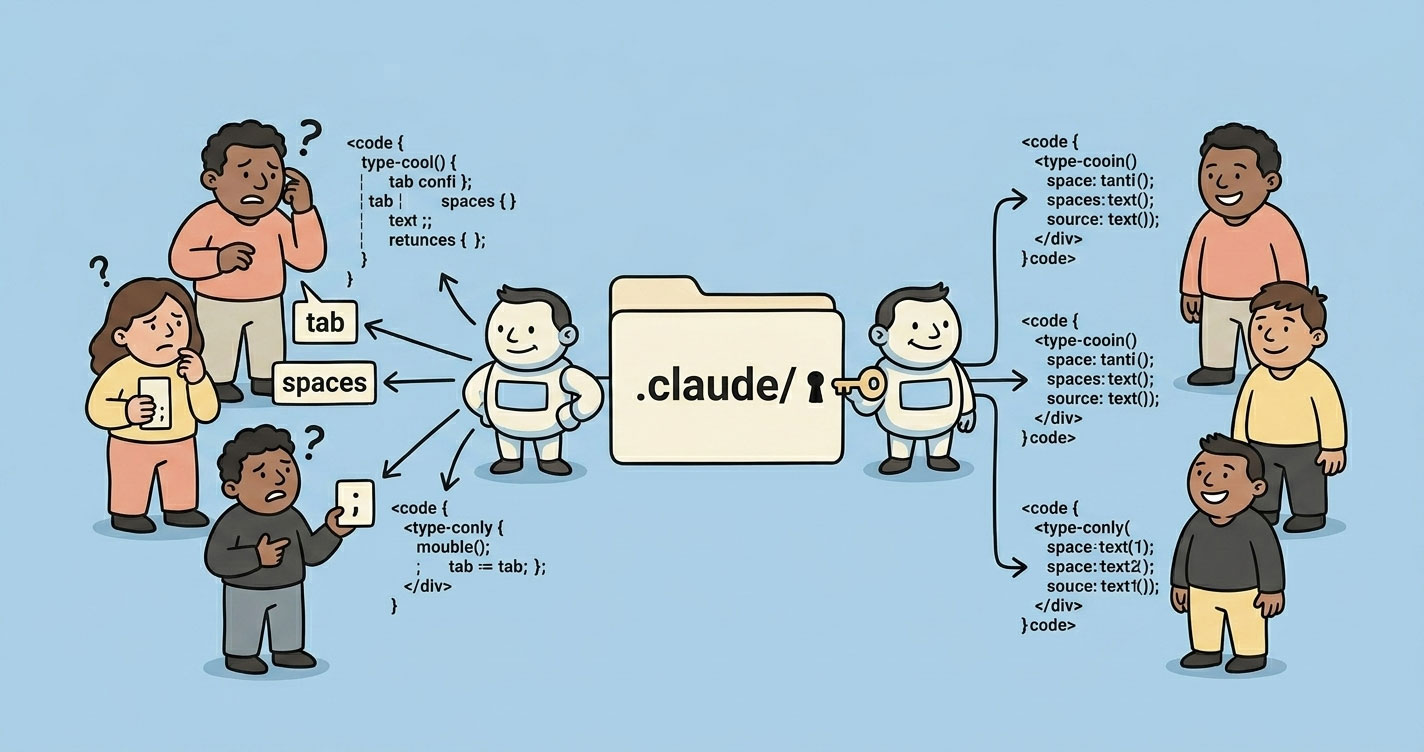

Claude Code works out of the box. It just doesn't scale out of the box.
Same repo. Same task. Different developers. Different outputs. At first it looked like random noise. Then it became a pattern. The problem wasn't Claude — it was the lack of shared context.
This article breaks down what the .claude/folder actually is, what belongs in each part of it, and how the same pattern shows up in Codex, Gemini CLI, and Cursor. If you're evaluating AI coding tools for a team, or trying to stop AI from silently eroding your conventions, this is the reference you want.
Claude Code works great solo and drifts hard in teams — same repo, same task, different developers, different outputs. The fix is the .claude/ folder, which turns the tool from a personal assistant into shared engineering infrastructure: project memory in CLAUDE.md, scoped permissions in settings.json, repeatable workflows in slash commands, and specialised behaviours in subagents. Codex, Gemini CLI, and Cursor all use the same pattern under different names. Without it, AI coding silently erodes your team's conventions.
The mental model: .claude/ is a configuration layer
Forget folder walkthroughs for a second.
.claude/ is the configuration layer for AI behavior in your repo. Nothing more, nothing less. It has three layers, and once you see them, the whole thing clicks:
- Instruction layer —
CLAUDE.md,rules/. Tells Claude how your project works. - Execution layer —
commands/,skills/. Defines repeatable workflows Claude can run. - Control layer —
settings.json,agents/. Defines what Claude is allowed to do and who does it.
That's the whole system. Everything else is detail.
This isn't just a Claude thing — Claude vs Cursor vs Gemini vs Codex
Once you understand .claude/, you start noticing the same pattern across every serious AI coding tool. Different filenames. Same underlying need: giving the AI shared context and real boundaries.
| Claude Code | OpenAI Codex (ChatGPT) | Gemini CLI / Antigravity | Cursor | What it does / Notes |
|---|---|---|---|---|
CLAUDE.md | AGENTS.md + system prompt | GEMINI.md | .cursor/rules/*.md | Team-wide instructions auto-loaded into every session. The highest-leverage file in the whole system. |
CLAUDE.local.md | ChatGPT Custom Instructions | GEMINI.local.md | No clean equivalent | Personal overrides. Gitignored. Lets individual devs tweak behavior without polluting team config. |
.claude/settings.json | Tool/function configs in code | .gemini/settings.json | Cursor UI settings | Permissions and config. Think IAM for your AI — allow, deny, or require confirmation. |
.claude/commands/ | Custom GPTs / CLI wrappers | .gemini/extensions/ (MCP) | Cursor plugins | Slash commands that inject shell output into the prompt. Real repeatable workflows. |
.claude/rules/ | Prompt fragments (DIY) | Scoped context files | .cursor/rules/ (MDC files) | Modular, path-scoped instructions. Cursor's recent MDC overhaul and auto-attached rules closed a real gap — it's now much closer to Claude than it used to be. |
.claude/skills/ | Function calling + Agents SDK | .gemini/skills/ (SKILL.md) | Cursor Skills / commands | Auto-invoked workflows. Claude decides when to run them based on the description — you don't type a slash command. |
.claude/agents/ | Multi-agent via SDK (CrewAI, LangGraph) | .gemini/agents/ (subagents) | No real equivalent | Specialized personas with their own context window and restricted tools. Parallel-friendly. |
~/.claude/ | ChatGPT memory + Custom Instructions | ~/.gemini/ | Weak equivalent | Global, cross-project config. Your personal defaults, not the team's. |
The real insight
The difference isn't the filename. The difference is how much control the tool actually enforces.
- Claude Code is opinionated. Folder structure is the API.
- Cursoris editor-first. The recent MDC rules overhaul closed a real gap, but the mental model is still “rules + UX” rather than “system.”
- Gemini CLI / Antigravitymirrors Claude's folder model almost exactly —
GEMINI.md,.gemini/skills/,.gemini/agents/. Different brand, same philosophy. - OpenAI Codex is flexible but DIY. You bring your own loader. That flexibility is also why two teammates can build two incompatible setups.
So if you're switching tools, you're not really switching frameworks. You're switching how strict the framework is about structure. That's the actual trade-off.
Why AI breaks at the team level
AI tools are built for one user at a time. That's the default assumption under every feature — memory, custom instructions, skills, personal shortcuts. The moment you plug the same tool into a team, that assumption breaks.
Three things happen, in this order:
1. Invisible inputs diverge. Every engineer has different ~/.claude/preferences, different ChatGPT memories, different Cursor rules. Nobody sees anyone else's config. The AI's “personality” is unique per machine.
2. Outputs drift from the same prompt.Same task, same repo, different answers. Sometimes the difference is cosmetic. Sometimes it's architectural. “Use zod” versus “use joi” is not a style disagreement — it's a future refactor.
3. The codebase inherits the drift. Over weeks, files start carrying the fingerprints of whichever engineer (and whichever AI config) touched them last. Reviews get noisier. PRs take longer. Onboarding gets harder.
This is the real team-level failure mode. Not hallucinations. Not bad suggestions. Drift. And no amount of prompt engineering fixes it, because the problem isn't the prompt — it's that each engineer is effectively running a different version of the tool.
If you're earlier in the AI adoption journey and still figuring out where it fits across your org, How I Use AI as a Manager to Save 10+ Hours Every Week covers the personal-productivity layer before teams start sharing config.
What most teams get wrong
None of the tools cause these. Teams do.
Treating CLAUDE.md as a documentation dump
If your CLAUDE.md is 300 lines, you've already lost. Context windows aren't free. Every line in there competes for attention with the actual task. Past a point, instruction adherence drops. Keep it under 200 lines. Split the rest into rules/.
No permission boundaries
Letting Claude run rm -rf without asking is a production incident waiting to happen. So is letting it curl arbitrary URLs, or read .env files. Yes, Claude respects .gitignore by default — but explicitly denying .env, .env.*, and similar paths in settings.json is non-negotiable. Belt and suspenders.
Personal, not organizational
The most common failure: one dev has a great setup in ~/.claude/. Nobody else does. The repo has no shared config. Every teammate gets different behavior. Over weeks, the codebase drifts.
The fix: centralize. Project .claude/ gets committed. Personal overrides go in .local. files that are gitignored by default.
Writing commands nobody integrates into workflows
A /review command that nobody runs before pushing is dead weight. The only commands worth keeping are the ones that become part of the actual loop — pre-push checks, PR prep, incident response.
Skills without a clear trigger description
Skills are auto-invoked based on their description. A vague description like “helps with code” means the skill either fires constantly or never fires. Either way, useless. Descriptions need to read like trigger rules: “Use when reviewing a PR before push” beats “Reviews code.”
The .claude/ system — explained through usage
CLAUDE.md — the highest-ROI file
This is the one file that earns its keep on day one. Claude loads it straight into the system prompt every session. Whatever you put there, it respects.
What belongs in it:
- Build, test, lint commands
- Architectural decisions (“we use a monorepo with Turborepo”)
- Non-obvious gotchas (“TypeScript strict mode is on, unused imports are errors”)
- Naming patterns, import conventions, error handling styles
- File and folder structure for main modules
What doesn't belong:
- Anything your linter or formatter already enforces
- Full docs you can link to
- Long paragraphs of theory
A good CLAUDE.md is short and specific. 150 lines is a good ceiling.
rules/ — when CLAUDE.md gets crowded
Once you cross ~200 lines in CLAUDE.md, stop. Split by concern:
.claude/rules/
├── code-style.md
├── testing.md
├── api-conventions.md
└── security.md
The real unlock is path-scoped rules. Add YAML frontmatter and the rule only activates when Claude touches matching files:
---
paths:
  - "src/api/**/*.ts"
  - "src/handlers/**/*.ts"
---
# API rules
- All handlers return { data, error }
- Use zod for request validation
- Never leak internal errors to clients
Now your React engineer isn't paying for context about API conventions while editing a component. And your backend engineer isn't reading frontend rules while editing a handler.
Cursor just shipped the same idea with MDC. Gemini does it through scoped context files. The pattern is becoming standard — for good reason.
commands/ — turn prompts into workflows
Every markdown file in .claude/commands/ becomes a slash command. A file called review.md becomes /review. That file can run shell commands and embed the output straight into the prompt:
---
description: Review the current branch diff before pushing
---
## Changes
!`git diff --name-only main...HEAD`

## Diff
!`git diff main...HEAD`

Review for:
1. Bugs, not just style
2. Security issues (secrets, injection, auth gaps)
3. Missing test coverage
4. Performance concerns worth flagging

Be specific. Reference files and line numbers.
That's the version we replaced CodeRabbit with. Every engineer runs /review before opening a PR. Output is consistent because the command is committed to the repo. One file, one workflow, whole team on the same page.
skills/ — when Claude should act on its own
Commands wait for you to type them. Skills watch the conversation and fire when the task matches.
A skill lives in its own folder:
.claude/skills/
└── security-review/
    ├── SKILL.md
    └── checklist.md
The SKILL.md uses frontmatter to describe when to use it:
---
name: security-review
description: Security audit. Use before deployments, on PR reviews touching
  auth or payment code, or when the user mentions "security".
allowed-tools: Read, Grep, Glob
---
Audit for:
1. SQL injection, XSS
2. Exposed secrets or hardcoded credentials
3. Auth/authz gaps
4. Insecure configs

Report findings with severity. Reference @checklist.md for our standards.
Now when someone says “check this PR for security issues,” Claude picks up the skill on its own.
The trade-off: skills are powerful because Claude decides when to run them. They're also unpredictable for exactly the same reason. If the description is sloppy, the skill fires on irrelevant tasks. Write descriptions like trigger rules, not marketing copy.
agents/ — specialist personas (and when they earn their keep)
An agent is a focused persona with its own context window, its own system prompt, and a restricted tool list. Claude spawns it, it does its job, it reports back. Your main session stays clean.
---
name: code-reviewer
description: Senior code reviewer. Use PROACTIVELY when reviewing PRs,
  checking implementations, or validating before merge.
model: sonnet
tools: Read, Grep, Glob
---
You are a senior code reviewer focused on correctness and maintainability.

- Flag bugs, not style
- Suggest specific fixes, not vague improvements
- Check edge cases and error paths
- Note performance concerns only when they matter at scale
Two reasons to reach for agents:
- Isolation — some tasks (security audit, large codebase exploration) produce thousands of tokens of intermediate work. Keeping that out of your main context keeps your session fast.
- Tool restriction — a security auditor has no business writing files. Giving the persona only
Read,Grep,Globmakes that explicit.
Some people argue agents are premature optimization. I don't buy that. They earn their place the first time you run a PR review agent in parallel with a security audit agent and get both back cleanly. The moment your workflow has two jobs that don't need to share context, agents pay off.
settings.json — your safety net
This is where DevOps thinking meets AI config. Think IAM for Claude.
{
  "$schema": "https://json.schemastore.org/claude-code-settings.json",
  "permissions": {
    "allow": [
      "Bash(npm run *)",
      "Bash(git status)",
      "Bash(git diff *)",
      "Read",
      "Write",
      "Edit"
    ],
    "deny": [
      "Bash(rm -rf *)",
      "Bash(curl *)",
      "Read(./.env)",
      "Read(./.env.*)",
      "Read(./node_modules/**)"
    ]
  }
}
Three tiers:
- Allow — runs without asking. Keep this focused on commands you actually use daily.
- Deny — blocked, no confirmation dialog, no override. Destructive shell commands,
.envreads, anything insecrets/. - Everything else — Claude asks before acting. That middle ground is a feature, not a bug.
Yes, Claude respects .gitignore by default. Deny the .env files anyway. Defense in depthmatters when the blast radius is “leaks a production secret to a model.”
A real setup — two repos, one team
Most teams today aren't a single repo. They're at least a backend and a frontend. So here's what a real setup looks like for each.
Backend repo (Node.js + Express + MongoDB)
backend/
├── CLAUDE.md
└── .claude/
    ├── settings.json
    ├── commands/
    │   ├── review.md           # pre-PR review
    │   └── index-check.md      # review Mongo index usage on hot queries
    ├── rules/
    │   ├── api-conventions.md  # paths: src/api/**
    │   └── db.md               # paths: src/db/**, src/models/**
    └── agents/
        └── security-auditor.md
CLAUDE.md (trimmed):
# Backend API

## Commands
npm run dev            # starts server with tsx
npm test               # vitest, hits a real local MongoDB
npm run lint
npm run build

## Architecture
- Express, Node 20, TypeScript strict
- MongoDB via Mongoose
- Schemas in src/models/, handlers in src/api/, domain logic in src/services/
- zod for request validation on every handler

## Conventions
- Response shape: { data, error }
- Never return stack traces to clients
- Use logger module, not console.log
- Prefer explicit types over inferred for public APIs
- Every new query path must be backed by an index — check before merging

## Watch out
- Tests hit a real Mongo instance. Run `npm run db:test:reset` before first run.
- No transactions outside replica sets. Local dev runs a single-node RS for parity.
- Schema changes are code-only — there's no migration runner. Be explicit in PRs.
settings.json — deny list covers .env, secrets, and destructive commands. Allow list covers npm run * and read-only git.
/review — runs git diff main...HEAD, checks for handler pattern violations, missing zod validation, and test coverage. /index-check scans changed query paths against the defined Mongoose indexes and flags anything unindexed before merge.
Frontend repo (Next.js 16 + Tailwind + shadcn)
frontend/
├── CLAUDE.md
└── .claude/
    ├── settings.json
    ├── commands/
    │   ├── component.md        # scaffold a new component
    │   └── review.md           # pre-PR review
    ├── rules/
    │   ├── design-system.md    # colors, spacing, typography rules
    │   └── a11y.md             # paths: components/**, app/**
    └── skills/
        └── accessibility-audit/
            └── SKILL.md
CLAUDE.md calls out the Next.js 16 App Router conventions (including the move from middleware.ts to proxy.ts), the shadcn+Tailwind setup, and the rule that no custom CSS files are allowed — everything goes through Tailwind utilities. It also flags which Next.js 15 patterns are deprecated in 16, so Claude doesn't pattern-match on stale training data.
The accessibility audit skill fires automatically when anyone touches a form component, a modal, or interactive UI. No one has to remember to run it.
What's shared
Both repos share the same settings.json baseline — same deny rules, same safety net. Both have a /review command with the same trigger (before PR). The rules files differ because the domains differ.
Nothing is replicated across the repos. If a rule genuinely applies everywhere (“never log PII”), it lives in ~/.claude/CLAUDE.md globally for the team — but you have to trust that every engineer has it locally. Most teams just duplicate it in both repos and move on.
Trade-offs (where this starts breaking)
Context vs control
More rules = more consistency. Also more context used per request. There's a ceiling. Path-scoped rules push that ceiling higher, but they don't remove it. If you find yourself writing rules for every edge case, the rules have stopped being leverage.
Automation vs safety
Skills that auto-invoke save time. They also fire on tasks you didn't intend. A security-review skill with a fuzzy description will start reviewing trivial config changes. The cost isn't the extra tokens — it's that you stop reading the output, and then you stop trusting it.
Commands vs skills
Commands are explicit. You type, it runs. Skills are implicit. Claude decides. Rule of thumb: if you want predictable, use a command. If you want Claude to pick up on intent, use a skill. Starting with commands and promoting a few to skills once the pattern is stable is the safer path.
Agents vs inline work
Agents isolate context. They also add latency and coordination overhead. For a 30-second task, skip the agent. For an audit that would otherwise eat 10K tokens of exploration in your main session, use one.
When NOT to do any of this
- Solo dev, small project —
CLAUDE.mdis still useful. The rest is overkill. - Teams without coding standards— no point configuring AI to enforce conventions you haven't agreed on. Fix the conventions first.
- Prototype / throwaway code— configuration has a cost. A prototype doesn't earn it.
- You only use AI for ad-hoc questions— if you're not writing production code with Claude, don't structure your repo around it.
A practical starter path
Don't try to build the whole thing on day one. Order matters.
- Run
/initto generate a starterCLAUDE.md. Trim it hard. Keep only what's non-obvious. - Add
.claude/settings.jsonwith a minimal allow list and a strict deny list for.env, secrets, and destructive commands. - Write one command — usually
/review— that you actually use. Commit it. Get the team to run it before PRs. - Split into
rules/only whenCLAUDE.mdgets crowded. Not before. - Add skills and agents only when you have workflows that repeat and matter enough to formalize.
Ninety percent of teams never need step 5. That's fine.
The takeaway
Most teams think they have an AI problem. They don't. They have a configuration problem.
Claude Code is powerful. Cursor, Gemini CLI, Codex — all powerful. None of them reduce drift across a team by default. They amplify it. Different engineers get different outputs, follow different patterns, and slowly pull the codebase in different directions.
The .claude/ folder fixes that. Not by making Claude smarter. By making your system more predictable.
Treat it like configuration. Treat it like infrastructure. Give it the same rigor as your CI config, your linter, your ESLint rules. Because the day you do, Claude stops being a helpful assistant — and starts behaving like part of your engineering system.
Real systems. No fluff.